
Want to make it easier for customers to contact you on WhatsApp without saving your phone number first? You can create a direct WhatsApp chat link in just a few simple steps.
With a WhatsApp chat link, anyone can start a conversation with you simply by clicking a link. This feature is especially useful for business owners, customer service teams, online sellers, and anyone looking to simplify communication.
The good news is that you don't need to download any additional apps. You can easily create a WhatsApp chat link using s.id.
Let's explore how to create a WhatsApp chat link quickly and easily!
What Is a WhatsApp Chat Link?
A WhatsApp chat link is a special URL that allows users to start a WhatsApp conversation with a specific phone number without saving it to their contacts.
When someone clicks the link, they are directed to a WhatsApp conversation with the designated number.
WhatsApp chat links can be shared across various digital platforms, including Instagram, TikTok, websites, emails, and other social media channels.
For businesses, this is a convenient way to connect with potential customers, answer questions, and provide faster customer support.
How to Create a WhatsApp Chat Link Using s.id
Creating a WhatsApp chat link is simple with the WhatsApp Link feature on s.id.
Instead of manually generating a WhatsApp URL, you can enter your phone number, add a pre-filled message, and customize your short link in one place.
Here's how to get started:
1. Log In to Your s.id Account
Visit s.id using your browser and log in to your account.
If you don't have an account yet, you can sign up to start creating and managing your links.
2. Select the WhatsApp Link Feature
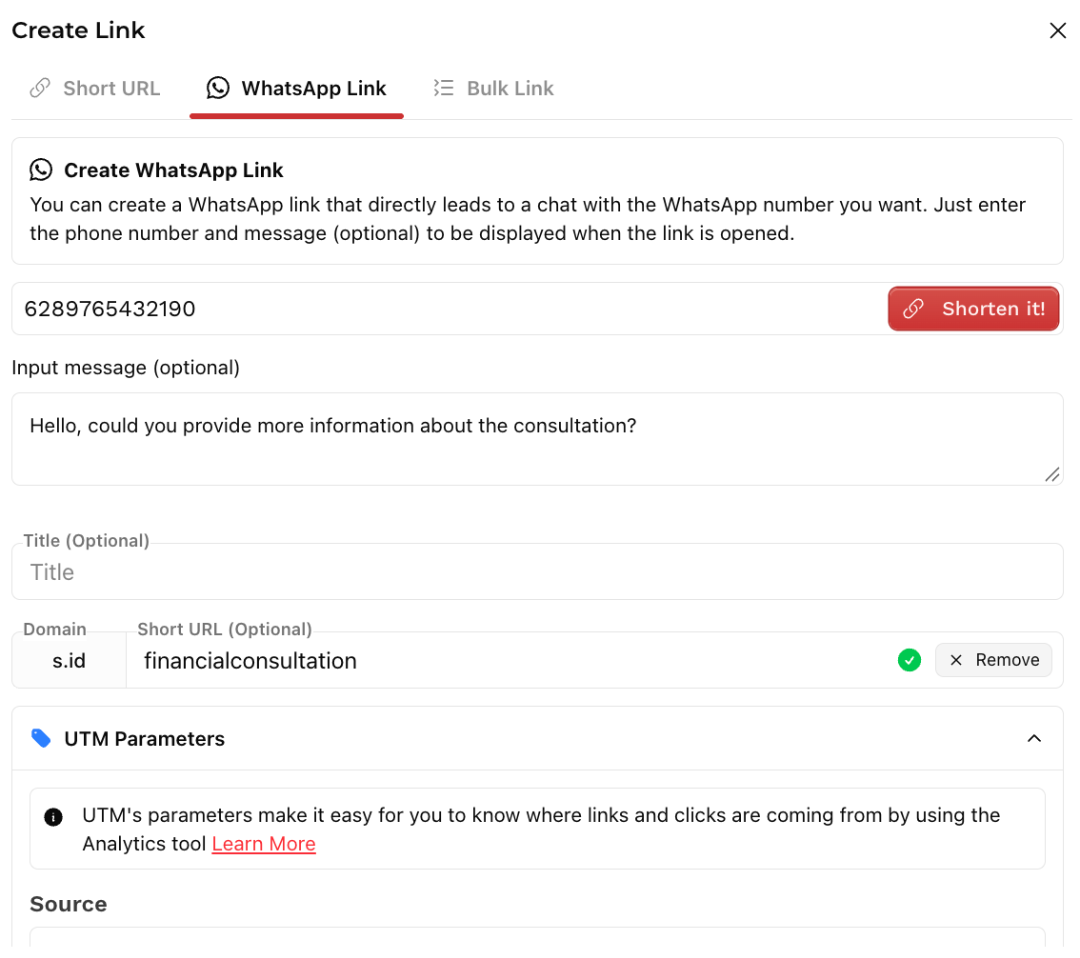
Once you're on the s.id dashboard, click Create Link and select the WhatsApp Link tab.
This feature allows you to create a link that directs users straight to a WhatsApp conversation with your chosen phone number.
3. Enter Your WhatsApp Number
Enter the WhatsApp phone number you want people to contact.
Make sure to use the international phone number format, including the country code.
For example, if you're using an Indonesian phone number, replace the first 0 with the country code 62.
Example: 6289765432190
Double-check that the number is correct and registered on WhatsApp.
4. Add a Pre-Filled Message (Optional)
In the Message field, you can add a pre-filled message that will automatically appear when someone opens your WhatsApp link.
For example:
"Hi, could you tell me more about your consultation services?"
This makes it easier for customers to start a conversation without typing a message from scratch.
The message will appear in the chat box, but users will still need to tap the send button to deliver it.
5. Add a Title and Customize Your Short Link
Next, you can enter a title to help organize and identify your WhatsApp link.
You can also customize your short link to make it easier to remember and more relevant to your business or service.
For example:
s.id/konsultasikeuangan_
A short, customized link looks cleaner and is easier to share across social media profiles, websites, and promotional materials.
6. Add UTM Parameters (Optional)
Want to understand where your visitors are coming from?
You can also add UTM parameters when creating your WhatsApp link.
UTM parameters help identify traffic sources and marketing campaigns when used with compatible analytics tools.
This can be useful for businesses running promotions across multiple digital channels.
7. Click Shorten and Share Your Link
Once you've entered all the necessary information, click the Shorten! button to generate your WhatsApp link.
After your link is created, simply copy and share it on Instagram, TikTok, websites, emails, or other digital platforms.
Now, anyone who clicks your link can open a WhatsApp conversation with you without saving your phone number first.
Benefits of Using a WhatsApp Chat Link
WhatsApp chat links offer several advantages for both personal and business communication.
1. No Need to Save Phone Numbers
Users can start a WhatsApp conversation without adding a new contact to their phone.
2. Faster Customer Communication
Customers can reach your business directly with just one click, making it easier to ask questions about products or services.
3. Perfect for Digital Marketing
WhatsApp links can be added to social media bios, websites, digital catalogs, and promotional materials to make your business more accessible.
4. Pre-Filled Messages for Convenience
With pre-filled messages, customers can start conversations faster without typing their questions from scratch.
5. Shorter and More Professional Links
Using s.id, you can turn your WhatsApp chat link into a short, customized URL that's easy to remember and share.
Tips for Creating an Effective WhatsApp Chat Link
To get the most out of your WhatsApp chat link, consider a few simple tips.
First, always make sure your WhatsApp number is correct and active so users can contact you without issues.
Second, keep your pre-filled messages short, clear, and relevant. For example, "Hi, I'd like to know more about your products" or "Hello, I'd like to place an order."
Third, place your WhatsApp link where your audience can easily find it, such as your Instagram bio, business website, or promotional landing page.
Finally, use s.id to create a shorter, customized WhatsApp link that looks clean and professional.
Create Your WhatsApp Chat Link Easily with s.id
Creating a direct WhatsApp chat link doesn't have to be complicated. With s.id, you can generate a WhatsApp link without manually formatting URLs or installing additional applications.
Simply enter your WhatsApp number, add an optional pre-filled message, customize your short link, and share it wherever you need.
Whether you're managing customer inquiries, promoting products, offering consultations, or communicating with your audience, a WhatsApp chat link makes connecting easier.
Ready to make communication simpler? Create your WhatsApp chat link today at s.id!